tellie://
Your notch has an API.
Push a glanceable line to the Mac notch from any app, your terminal, or an AI agent. One URL scheme, a zero-dependency CLI, and an MCP server. Read it back, too.
100% free
cookbook / narrate-to-your-notch
Watch your agents think.
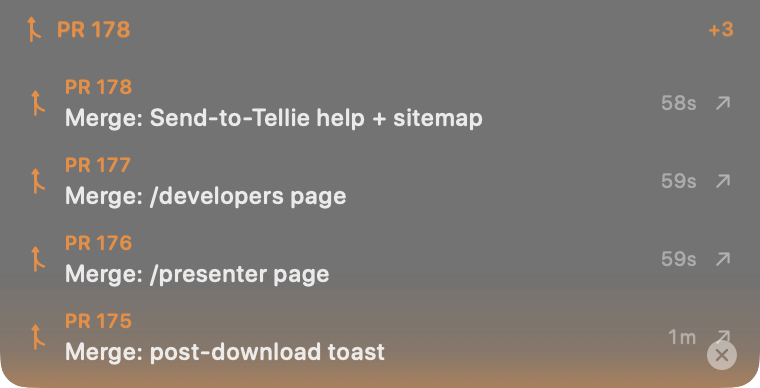
A real Tellie notch mid-deploy: every agent and PR pushing its own line, newest on top, each one clickable. Your tools, narrating themselves, while you keep typing.
Two lines of setup, then your agent does the rest. It's the start-here recipe in the cookbook. Always free.
three ways in
Whatever you've got, it can talk to the notch.
Same surface, three front doors. Spaces are encoded for you; use -g so it never steals focus.
# from anything that can open a URL
open -g "tellie://update?\
text=Build%20passing&\
source=CI&icon=hammer"# zero deps
tellie update "Build passing" \
--source CI --icon hammer
tellie flash "Deployed" --source CI// add to your MCP client
{
"tellie": {
"command": "npx",
"args": ["-y", "@tellie/mcp"]
}
}read it back
It's a two-way surface.
Your agents can read the notch too: see who's already reporting, avoid double-work, or summarize the day. The live roster is free; history needs Pro.
# the live roster, right now
tellie status --json

# history (Pro records it)
tellie log --source CI --since 6h

# MCP tools
read_notch()   // live
read_log({ sinceHours: 24 })
mission control
Every agent reports under its own name and icon. Hover the notch to peek the whole fleet at a glance.
it remembers
A log of everything. In plain text. That you own.
Plenty of tools show you what an agent is doing right now. Tellie also keeps the history: Pro records every line to a local, append-only JSONL file (one per day, 30-day rolling) that never leaves your Mac. No dashboard, no account. Just jq and tail.
# links an agent handed you today
jq -r 'select(.link).link' "$LOG"

# what each source reported
jq -r '"\(.source): \(.text)"' "$LOG"

# alert when an agent needs you
tail -f "$LOG" | jq 'select(.attention)'
the second screen that remembers
Scroll back to see exactly what an agent did and when. Reopen any PR or preview it handed you. Pipe the day to an LLM for a standup. It's your data, in a file you can grep, not a SaaS dashboard you log into.
cookbook
It's a primitive. Here's what people build with it.
The verbs are the point. A few recipes to start; bring your own.
⭐ Narrate to your notch
The start-here recipe: your agent shows what it's actually doing, live, and hands you clickable links when it's done. Lifecycle + descriptive updates + attention.
⭐ Mine your Pulse Log
jq the local JSONL history: agent turn durations, every link a tool handed you, tail -f for "needs you," or feed the day to an LLM for a standup.
Agent lifecycle
Your AI agent flips the notch to "Thinking…" on every turn and clears when it's done, perfectly synced via harness hooks.
Build & test status
Wrap a build so the notch shows progress and the result, with a red pulse on failure.
CI to the notch
Reflect a GitHub Actions run; click the line to jump straight to the failed job.
Token + cost meter
A live tokens / cost / files meter in the notch while an agent works.
Fleet coordination
Several agents announce themselves, check the roster before claiming work, and hand off.
Bring your own
Pomodoro timers, cheat sheets, "now reading," reminders. If it can run a command, it can light up your notch.
get started
Give your tools a face.
Install Tellie, then push your first line in one command.
open -g "tellie://update?text=Hello%20notch&source=shell"